
Blog
How to Fix IQOS ILUMA i Prime

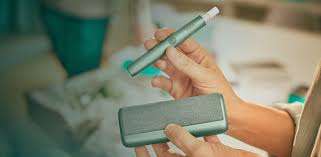
The IQOS ILUMA i Prime is a premium heat-not-burn device designed with induction heating technology. Unlike older IQOS models, it has no heating blade and uses SMARTCORE induction system for TEREA sticks. While it is generally reliable, users may sometimes face issues such as not turning on, charging problems, heating errors, or stick recognition failures.
This guide explains the most common problems and how to fix them step by step.
1. Device Not Turning On
Possible Causes
- Battery completely drained
- Software glitch
- Device frozen due to internal error
- Charging port issue
How to Fix It
Step 1: Charge the Device Properly
- Connect the IQOS ILUMA i Prime to its original charger
- Ensure the charger is plugged into a stable power source
- Leave it charging for at least 20–30 minutes before trying again
If the battery was fully drained, it may take time before any light appears.
Step 2: Perform a Reset
If charging does not help:
- Press and hold the button for about 10–15 seconds
- Wait for vibration or light response
- Release and allow the device to restart
This can clear minor system freezes.
Step 3: Check Charging Accessories
- Make sure cable is not damaged
- Try another compatible charging adapter
- Clean the charging port gently using a dry cotton swab
2. Device Not Charging
Possible Causes
- Faulty cable or adapter
- Dirt in charging port
- Battery protection mode activated
Fix Methods
Step 1: Inspect Cable and Adapter
- Use only original IQOS charger
- Try switching power outlets
- Replace damaged cable if needed
Step 2: Clean Charging Area
Dust or lint can block charging connection:
- Turn off device
- Use a dry soft brush or cotton swab
- Avoid using liquids
Step 3: Temperature Check
If the device is too hot or too cold, it may not charge.
- Let it return to room temperature
- Try charging again after 10–15 minutes
3. Not Heating TEREA Stick
Possible Causes
- Stick not inserted correctly
- Induction system error
- Low battery
- Dirty internal chamber (rare in ILUMA but possible)
Fix Methods
Step 1: Reinsert Stick Properly
- Remove TEREA stick
- Reinsert gently until it stops
- Do not force it
Improper insertion is one of the most common issues.
Step 2: Check Battery Level
- If battery is low, heating will not start
- Charge device fully before use
Step 3: Restart Device
- Hold power button for 10–15 seconds
- Wait for vibration reset
- Try again
Step 4: Try a New Stick
Sometimes the issue is with the stick itself:
- Damaged or defective TEREA stick may fail to heat
- Use a fresh one to test
4. Blinking Lights or Error Signals
IQOS ILUMA i Prime uses light indicators to show problems.
Common Light Patterns & Fixes
Continuous Red Light
- Indicates system error or overheating
Fix: - Turn off device
- Let it cool for 15–20 minutes
- Restart after cooling
Blinking White Light
- Usually indicates charging or connection issue
Fix: - Check charger connection
- Reset device
No Light at All
- Battery empty or device frozen
Fix: - Charge for at least 30 minutes
- Perform reset
5. Device Overheating
Causes
- Continuous back-to-back use
- Hot environment
- Charging while in use
Fix Methods
Step 1: Stop Using Immediately
- Turn off device
- Allow cooling for at least 20–30 minutes
Step 2: Avoid Heat Exposure
- Do not leave in direct sunlight
- Keep in cool, dry place
Step 3: Reduce Usage Frequency
- Allow breaks between sessions
- Prevents long-term battery damage
6. TEREA Stick Not Recognized
Possible Causes
- Improper insertion
- Damaged stick
- Sensor glitch
Fix Methods
Step 1: Reinsert Correctly
- Remove stick carefully
- Insert again slowly and fully
Step 2: Try Another Stick
- If second stick works, original one is faulty
Step 3: Restart Device
- Hold button for reset
- Retry insertion
7. Battery Draining Too Fast
Causes
- Frequent usage
- Battery aging
- Background system load
Fix Methods
Step 1: Full Charging Cycle
- Charge to 100%
- Do not interrupt charging
Step 2: Avoid Overuse
- Give device rest between sessions
Step 3: Temperature Control
- Avoid extreme heat or cold
- Battery performs best at room temperature
8. Device Not Vibration Responding
IQOS ILUMA i Prime uses vibration feedback for status signals.
Fix Methods
Step 1: Restart Device
- Hold power button for 10–15 seconds
Step 2: Charge Device
- Low battery may disable vibration function
Step 3: System Reset
- Perform full reset cycle
- Wait for confirmation light
Final Advice
Most IQOS ILUMA i Prime issues are not serious and can be solved by:
- Resetting the device
- Checking charging setup
- Allowing cooling time
- Ensuring correct TEREA usage
Because it uses advanced induction technology, it is less prone to mechanical damage than older models. However, proper handling and regular care are still important for long-term performance.
If you want, I can also explain hidden error codes, advanced reset methods, or comparison with IQOS ILUMA standard models.